Generating pages and posts
MembersIntel can write posts and pages for your membership site, and send them to WordPress as drafts for you to review. This guide covers what it does, what it costs, and the one setup step that catches most people out.
Before you start: choose an author
This is the step people miss, and nothing can be sent to your site until it is done.
MembersIntel writes drafts into WordPress as a real WordPress user. It will not guess which one. Until you pick, every attempt to send content to your site fails with:
Nobody has chosen which WordPress user MembersIntel authors as. Pick an author on the site’s MembersIntel settings page.
To fix it, open your site’s wp-admin → MembersIntel → Settings tab and choose a user. Pick someone who is allowed to write the kind of content you want — drafts are attributed to that person exactly as if they had written them.
You only do this once per site.
If MembersIntel built the site for you, this is already done — the build picks an author for you before it writes anything. This step applies to sites you connected yourself.
Generating a post or page
Content generation lives under Generations in the MembersIntel sidebar.
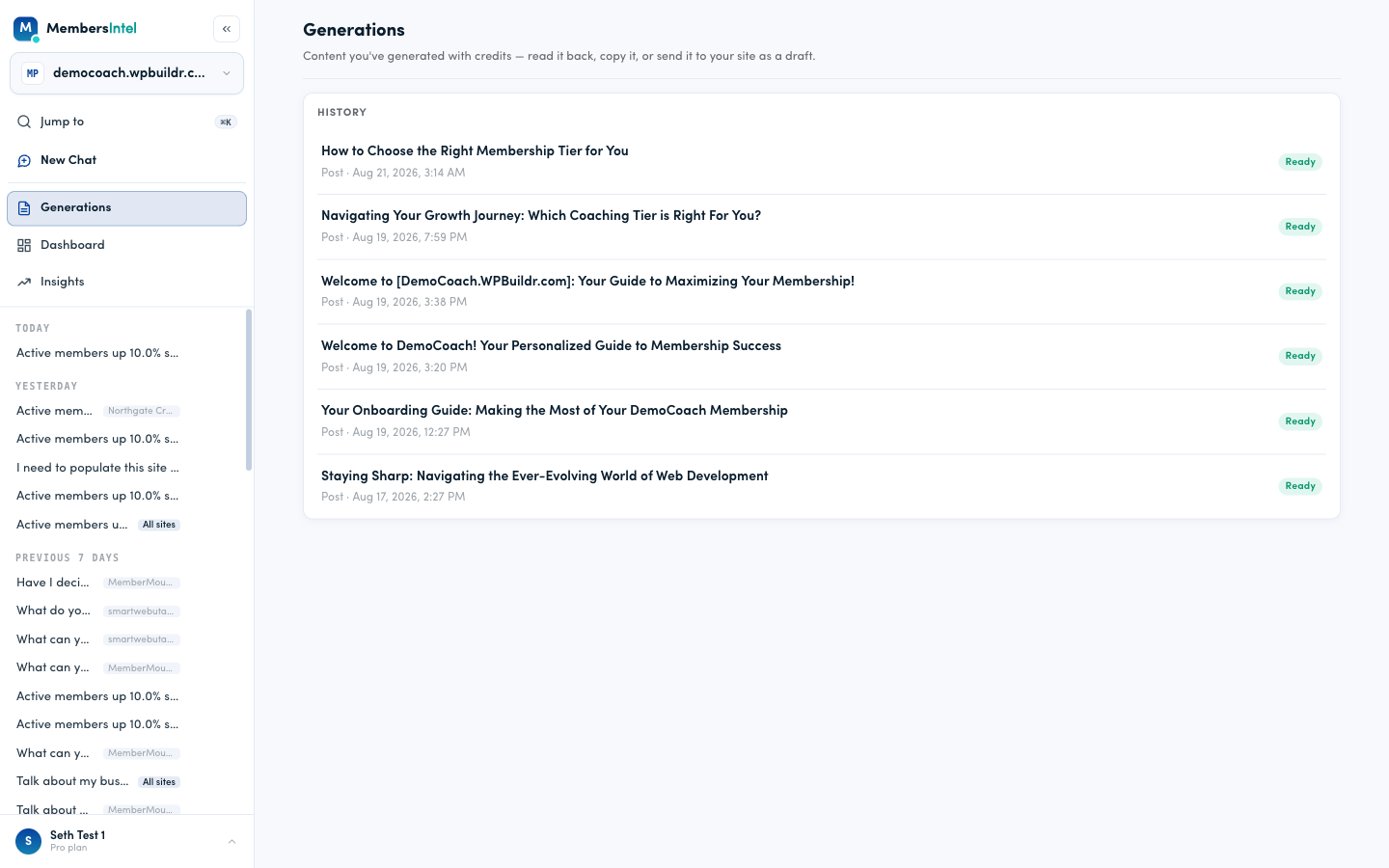
Each row is one piece of content: its title, whether it is a post or a page, when it was generated, and its status. Ready means the text has been written and is waiting for you.
Generation takes about 10–15 seconds. In the run used for this guide it took 12.6 seconds from request to finished.
Reading what was written
Select any row to read the full result.
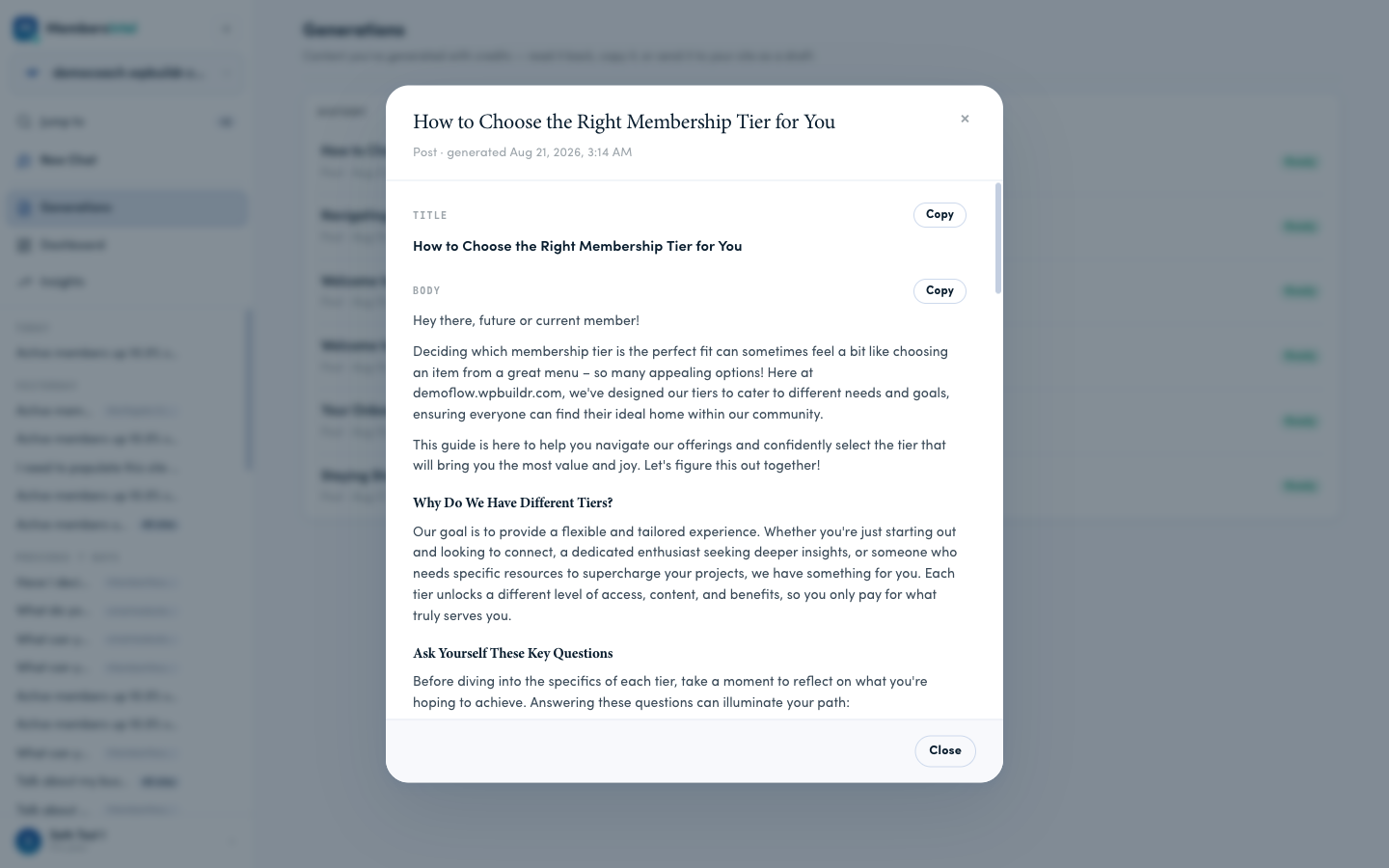
You get the title and the body, each with its own Copy button, so you can paste the content anywhere you like — you are never locked into sending it to WordPress.
The content is written with your site in mind. In the example above, the model referred to the site by name and to its actual membership tiers, because it has your site’s context to work from.
Sending it to your site
At the bottom of the same panel is the option to send the content to WordPress.
What sending does:
- Creates a draft on the site the content was generated for.
- Publishes nothing by itself. The draft is invisible to your members until you publish it — either here, with a second click that spells out the page will be publicly visible, or in WordPress yourself.
- Spends no credits. You paid when the content was generated; sending it costs nothing extra.
If you have not chosen an author yet, this is where you will find out:
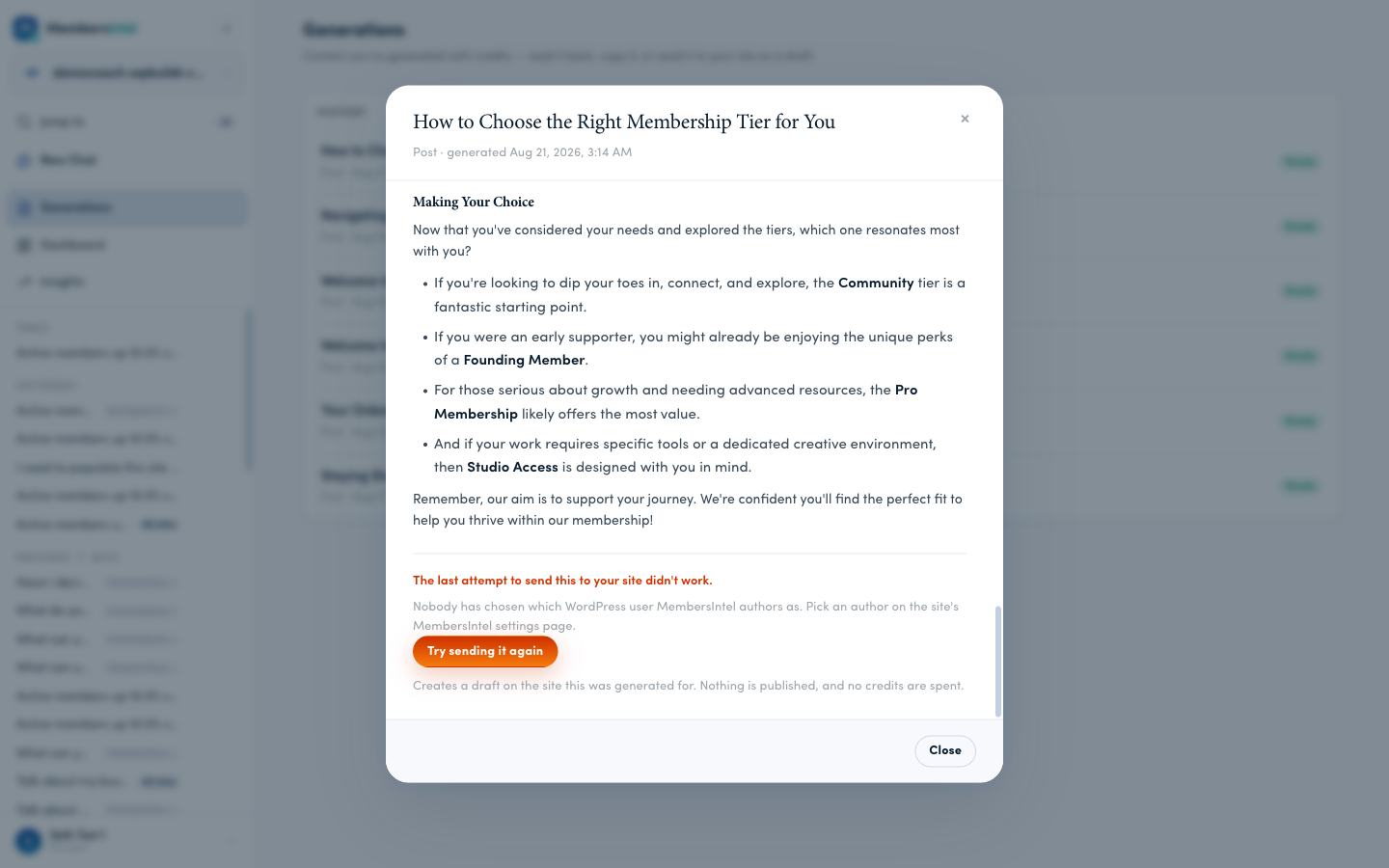
Nothing is lost when this happens. Your content is still there, you have not been charged twice, and once you have picked an author you can use Try sending it again on the same content.
Once it succeeds, the panel confirms it and gives you a direct link into WordPress:
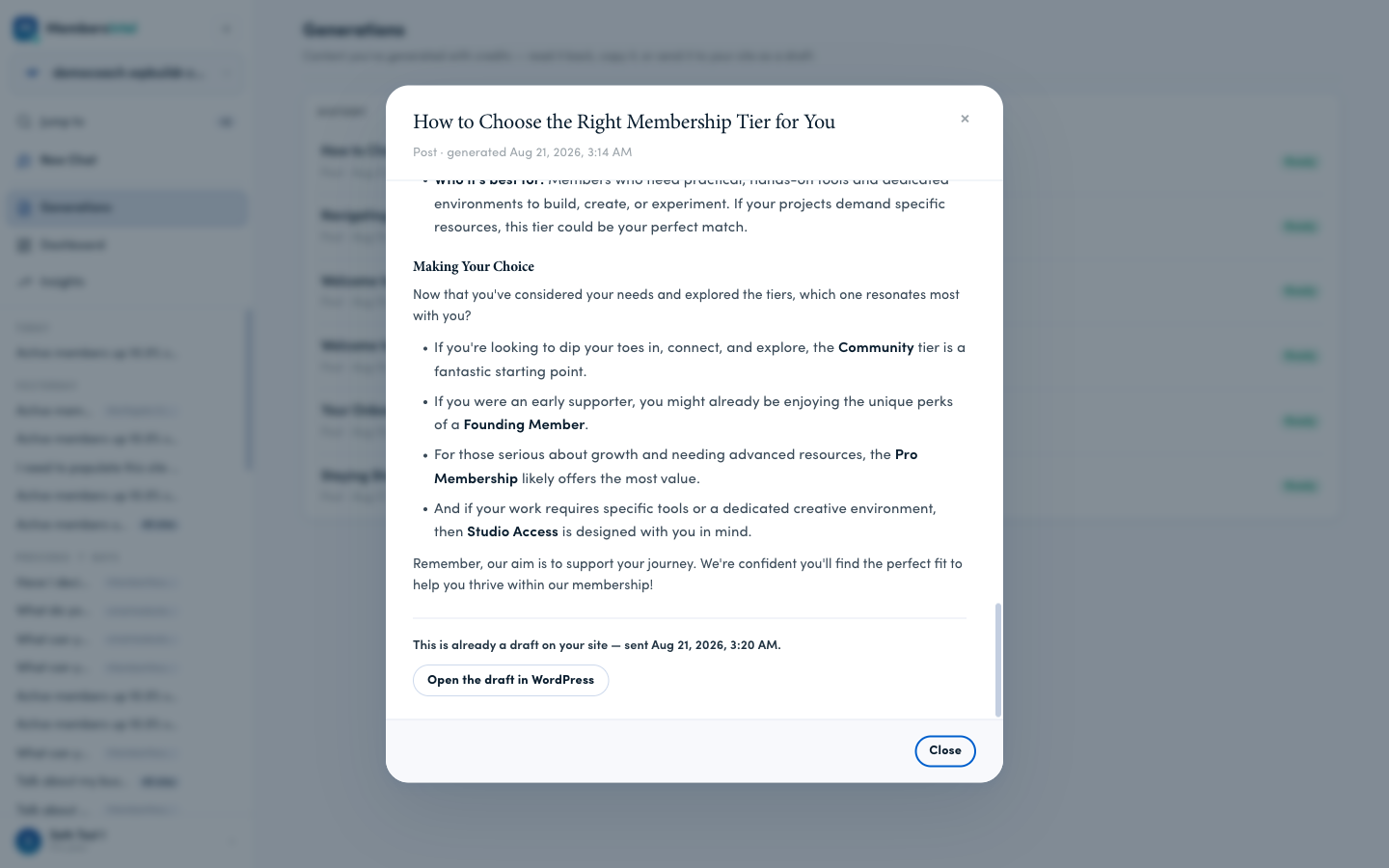
This is already a draft on your site — sent Aug 21, 2026, 3:20 AM.
Open the draft in WordPress takes you straight to the WordPress editor for that draft, where you can edit it, schedule it, or publish it — all in WordPress, under your control.
What it costs
Generation is a Pro feature. On a free account the Generations link is not shown in the sidebar; opening the page directly shows an upgrade panel — “Generations are a Pro feature” — rather than an error.
| action | cost |
|---|---|
| One generation | 50 credits |
| Sending a generation to your site | free |
| Re-sending the same content (API) | free |
The app deliberately does not offer a one-click re-send once a draft exists, because a second write would overwrite the draft on your site and silently discard anything you had edited there. Use Copy instead. A Try again button appears only when a send failed, and that is free. Anything labelled 50 credits is a brand-new generation, not a re-send.
Your remaining balance is shown in the app. Credits come from two pools: a monthly allotment that resets at the start of each month, and a one-time grant that never expires. Monthly credits are spent first, so your grant is kept for when you need it.
A note on plan changes: your monthly allotment is set when the month’s credits are issued. If your plan’s allowance changes partway through a month, the new amount applies from the next month rather than topping up the current one.
When something goes wrong
| What you see | What it means | What to do |
|---|---|---|
| Nobody has chosen which WordPress user MembersIntel authors as | The one-time setup step is not done | Pick an author in wp-admin → MembersIntel → Settings |
| The WordPress user MembersIntel authors as no longer exists. Pick a new author on the site’s MembersIntel settings page. | The chosen author was deleted from WordPress | Pick a new author in the same place |
| Not enough credits | Your monthly allotment and grant are both exhausted | Wait for the monthly reset, or buy credits |
| Generation failed | Something went wrong while writing | Try again; the credits for a failed generation are not kept |
| Content generation is a Pro feature | The account is not on Pro | Upgrade to Pro |
A failed generation does not cost you credits. Credits are reserved when a generation starts and only charged when it succeeds.
Things worth knowing
Content you send to your own connected site arrives as a draft, and stays one until you say otherwise. The advisor cannot publish it. Publishing is a separate, deliberate act: you either do it in WordPress, or you do it here through a confirmation that states the page will be publicly visible to anyone who visits. Nothing infers that decision from anything else you did.
A site MembersIntel builds for you is the one exception, and only with your recorded approval. When we provision a new site, its starter pages can be published automatically — but only if you explicitly approve that once, and we record who approved it and when. Without that recorded approval the starter pages are written as drafts and nothing goes live. There is no way for the system to infer your approval from anything else.
The content is yours to change. Nothing expects you to publish what was written verbatim. Copy it, edit it in WordPress, use half of it — the generated draft is a starting point.
Read it before you publish it. MembersIntel writes confidently, and it can be confidently wrong about details of your business. It works from what your site tells us, so anything your site does not say, it is guessing at. Check names, prices, dates and claims before anything goes live.
FAQ
Does generated content get published to my site automatically?
Not on its own. Sending a generation to WordPress creates a draft by default, and the advisor cannot publish anything — publishing is a deliberate act you take. You can publish from MembersIntel with a second, explicit click that says the page will be publicly visible, or leave it as a draft and publish it in WordPress yourself. The separate case is a site MembersIntel builds for you, where the starter pages can be published if you approved that up front.
Does sending content to WordPress cost extra credits?
No. You paid when the content was generated. Sending it to your site is free, and so is retrying a send that failed.
What happens if a generation fails?
You are not charged. Credits are reserved when a generation starts and only charged when it succeeds.
Why can I not re-send content that is already a draft?
A second write would overwrite the draft on your site and silently discard anything you had edited there. Use Copy instead. A Try again button appears only when a send actually failed, and that is free.